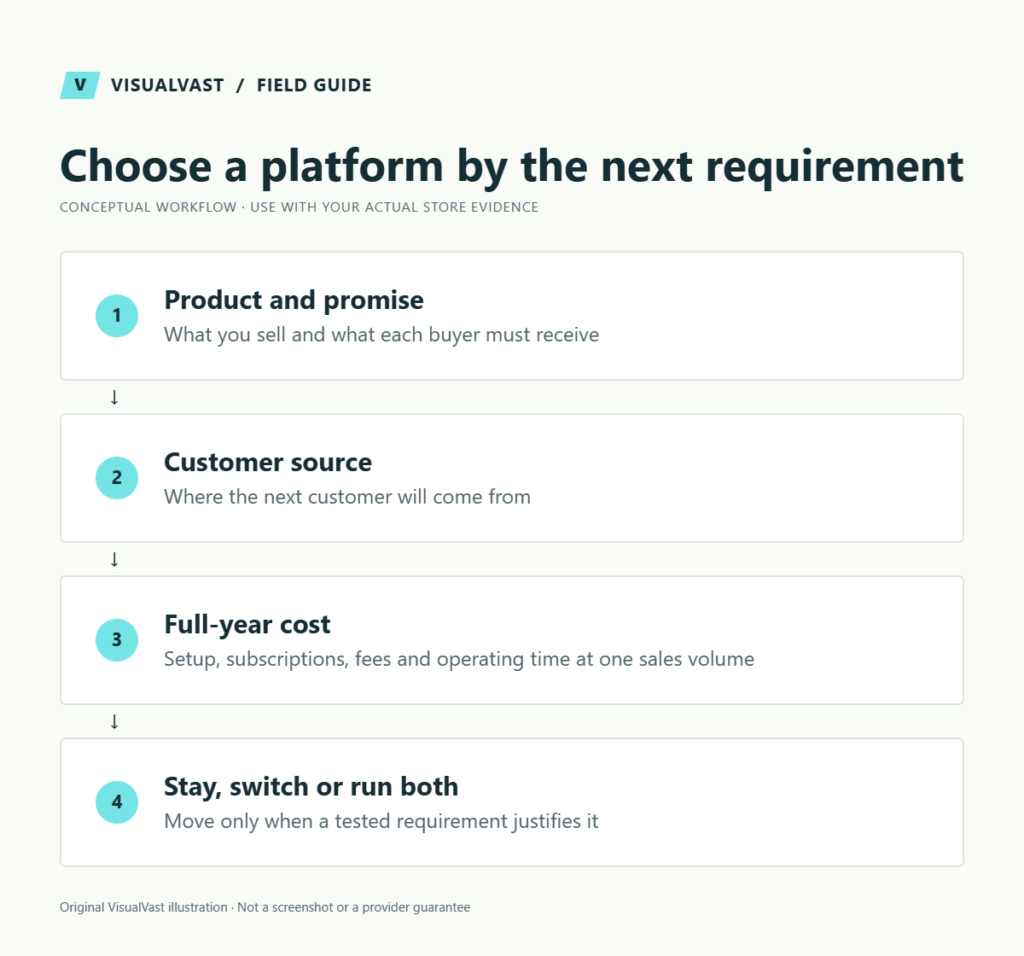
The best ecommerce platform is the one that supports your next important business requirement at a cost and operating workload you can sustain. Start with what you sell, how buyers find you and who handles delivery and maintenance. Stay with a working platform when a change has no clear benefit; add an owned channel without abandoning marketplaces that still work.
Which ecommerce platform fits your business?
| Platform to investigate | A useful starting profile | Read the focused decision guide |
|---|---|---|
| Payhip | A digital-product business prioritizing straightforward selling and delivery | Payhip vs WooCommerce |
| Sellfy | A creator evaluating a bundled store with downloads and merch | Sellfy vs WooCommerce |
| Fourthwall | A creator balancing community, memberships and merchandise | Fourthwall: stay, switch or both |
| OpoShop | A POD business evaluating a focused storefront and supported provider workflow | OpoShop vs WooCommerce |
| Shopify | A seller seeking a hosted commerce setup with tested integrations | Shopify vs WooCommerce after Etsy |
| WooCommerce | A business with justified WordPress commerce requirements and maintenance ownership | Owned-store readiness checklist |
These are editorial starting points; each platform can sell more than its row shows. The detailed guides link current official documentation and explain what to test. This is a documentation-led decision framework. We did not run hands-on performance benchmarks or test every checkout and integration.
Start with the product and the promise
A downloadable template, a made-to-order shirt and a stocked product impose different obligations. The template needs reliable file access. The shirt needs a correct provider mapping and realistic delivery promise. The stocked product needs inventory and shipping control. A subscription adds recurring billing and entitlement questions.
Use our digital, POD and physical product comparison to define those obligations before comparing software. A business selling all three should test a combined purchase to confirm the three product types work together for the customer.
Write down where the next customer comes from
An existing audience, marketplace discovery, paid campaigns and search-led content are different acquisition systems. Each one takes its own work after the store goes live. If the new channel depends on articles, tutorials or product education, create a site-structure plan and assign someone to publish and maintain useful content.
If you are starting from zero, use the no-audience launch guide. If you already sell on Etsy, plan how Etsy and your own store work together. Avoid measuring the new site’s potential by assuming marketplace traffic will simply follow it.
Ask eight questions before looking at plans
- Which product and order types must work at launch, including exceptions?
- What is the first repeatable source of qualified visitors?
- Which exact provider, email or operational integration is essential?
- How much weekly time can the team devote to operating the store?
- Who owns updates, backups, support escalation and recovery?
- What is the complete first-year cost, including setup and overlap?
- Which party handles payment, fulfillment and tax-related responsibilities?
- What can be exported if the next business constraint requires another change?
Shortlist two platforms after answering these questions. Mark each essential requirement as demonstrated, needs testing or unsupported. An unresolved essential requirement should block the decision even if the platform scores well on optional features. Keep answers specific. Turn “good SEO” into requirements you can check: a content structure, editable product information and an accountable publishing plan. Turn “scalable” into an acceptance test: a representative order volume and the required workflow.
Compare cost on equal terms
Compare a full year: one-time setup + 12 months of subscriptions, hosting and maintenance + fees at the same sales volume + operating time. Include paid extensions and any period when both stores must remain active. Add fulfillment costs where relevant and a contingency for exceptions. Use current vendor quotes for your region and payment method; plans and included features change.
Check the official pages for Payhip, Sellfy, Fourthwall, OpoShop, Shopify and WooCommerce. Do not treat a provider’s marketing comparison as an independent total-cost estimate.
Our launch-budget worksheet guide helps identify missing categories. The break-even calculator explores your assumptions without promising sales. POD sellers should separately test cash timing, because production bills and accessible payouts may occur on different days.
Don’t choose WooCommerce yet if…
- You cannot name a current requirement that benefits from the proposed implementation.
- Your offer and traffic plan are still untested and a simpler experiment would answer the next question.
- No one has accepted responsibility for maintenance and restore testing.
- The budget covers a design but omits operations, integrations and support.
- You are hoping a new platform alone will fix weak demand.
WooCommerce can be a strong choice when it solves a concrete need. It can also add avoidable work. Run the readiness assessment and assign maintenance responsibilities before making it the default.
Stay, switch or run both
Stay and improve
Choose this when the current platform supports your near-term plan and the main opportunity is clearer product information, a better offer or qualified traffic. Use the traffic diagnosis guide to distinguish acquisition from a broken buying journey. Its diagnostic reasoning is useful even when the store is not on WooCommerce.
Switch after a successful prototype
Choose this when a recurring constraint has a meaningful cost and the replacement passes the relevant test. For a digital store that might mean historical access and file updates. For POD it might mean correct variants, routing and combined shipping. For a broader catalog it might mean a specific search and purchasing journey.
Run both with a defined role
Choose this when separate roles justify extra administration: perhaps existing memberships remain in one system while a distinct product range launches elsewhere. Document support, reporting, customer accounts and review dates. Two platforms should not leave customers guessing where their purchase lives.
The migration gate
Before committing, inventory products, URLs, customer records, consent, orders, files, subscriptions, fulfillment, analytics and email. Verify exports with samples. Record what cannot move automatically. Payment credentials, recurring billing and customer passwords need written answers from each provider.
Rehearse a small migration and use the checkout test plan. Keep a URL map using the SEO migration checklist, preserve access for existing customers and assign unresolved orders to an owner. Only then select the cutover sequence and support window.
Turn uncertainty into a scoped next step
An Owned Store Readiness / Migration Audit is appropriate when you have unresolved platform or migration questions. A WooCommerce Owned Store Launch follows a justified platform decision. Multichannel & POD implementation addresses product and fulfillment connections; SEO & Traffic Foundations addresses discoverability; Care & Maintenance supports ongoing operation.
Start with the guide matching your present platform, write the requirement you need to prove and test that requirement. The useful outcome may be a migration, a smaller improvement or a confident decision to stay.
Readiness Audit
Plan the build before you pay for it
The Owned Store Readiness Audit reviews your catalog, operations, budget and route to customers. You get written findings, a 45-minute walkthrough and a clear call: build now, start smaller or fix the gaps first. $349 USD.