Keep Fourthwall when its creator-focused selling and fulfillment arrangement serves your audience well. Evaluate WooCommerce when a specific commerce requirement justifies operating a different system. Running both can work when each has a clear purpose, such as keeping existing memberships while adding a separate product business. It also adds administration.
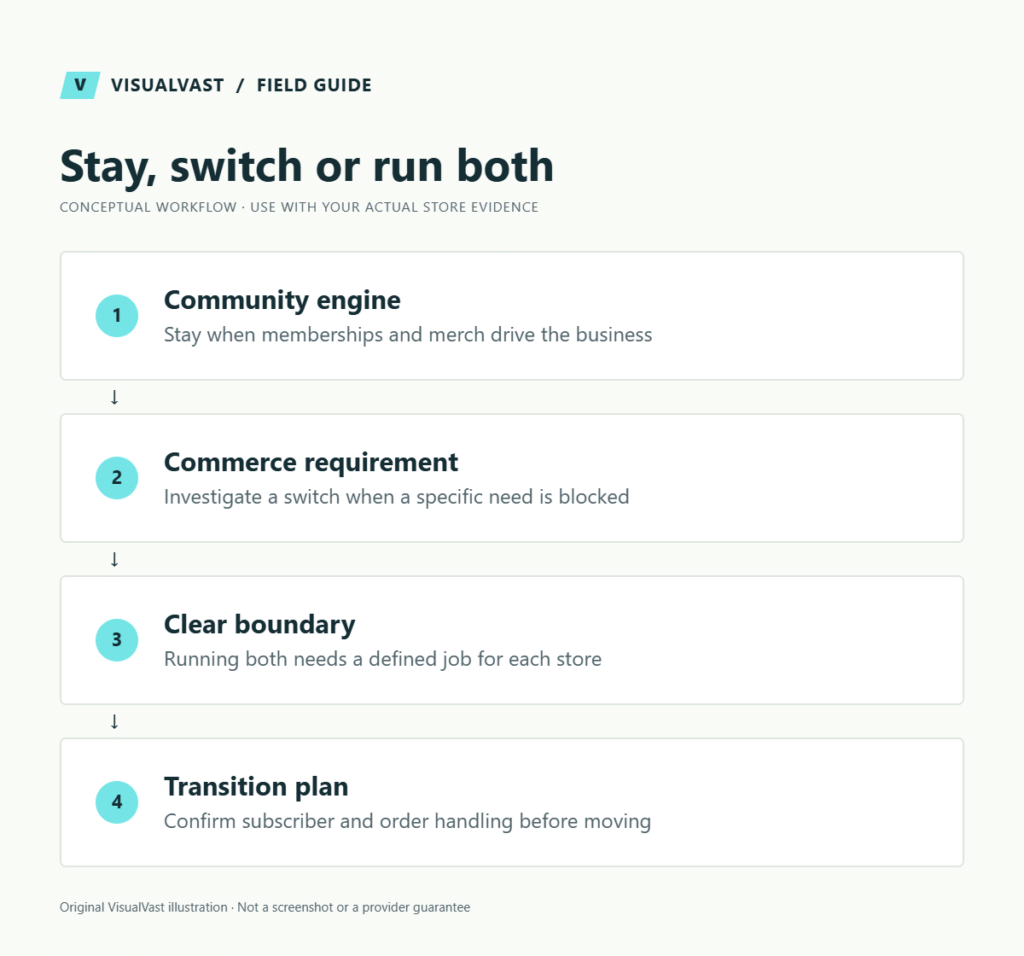
A decision in one minute
| Business priority | Direction to investigate |
|---|---|
| Creator merch and community with an effective existing workflow | Keep Fourthwall and improve the offer |
| WordPress content supporting existing creator products | Add or improve the content site without automatically replacing checkout |
| A distinct catalog needs custom fulfillment or purchasing logic | Prototype a separate WooCommerce workflow |
| Existing memberships need uninterrupted billing and access | Preserve continuity before considering a move |
| Little demand and no clear operational constraint | Validate demand before adding another store |
Our platform decision hub places this choice alongside Payhip, Sellfy, OpoShop and Shopify. Choose around the business you operate.
Compare responsibility as carefully as features
Fourthwall’s current pricing and service explanation describes its merchant-of-record role, including sales-tax handling. Its Free tier charges a 5% digital-product fee and includes 5 GB of digital storage. Pro, at $19 a month or $180 a year, removes that fee and provides 100 GB. Accounts created on or before August 25, 2025 keep a 3% digital-product fee on Free, and memberships carry a 5% fee on both plans. Compare the selected billing interval before budgeting for Pro. Payment-processing charges and product costs still apply. Fourthwall handles customer support for products from its catalog; you handle support for items you source and ship yourself. Confirm live terms for your country and products before budgeting.
This is an important operational distinction. Replacing the checkout can change who handles payments, customer issues and tax-related tasks. Do not assume a plugin recreates the commercial arrangement of a merchant-of-record service. Document responsibilities with the relevant providers and advisers for your actual business.
“Owned channel” is also not a binary label. Consider who controls the domain, can export usable data, manages customer permissions and can move essential workflows. Every setup retains dependencies on payment providers, infrastructure and fulfillment partners. Judge each setup by its exit path, hosted or self-managed.
Stay when community is the engine
Consider a fictional educator whose followers buy occasional merch and support recurring community content. If the existing experience works and the next priority is making better content, a platform migration may distract from the strongest part of the business.
Improve navigation, product clarity and release planning first. A separate WordPress editorial site could support discovery without introducing a second checkout. Test the whole journey from article to purchase, including campaign attribution and a clear route back to customer support.
Investigate a switch when commerce requirements change
Perhaps the next stage involves stocked items, a specific external fulfillment operation or a purchasing journey that differs substantially from creator merch. Write that requirement as a test: “A buyer must be able to do X, and the operations team must receive Y.” Ask whether the present platform can meet it before assuming replacement is necessary.
Use the digital, POD and physical product guide to identify separate delivery obligations. For a mixed physical catalog, test POD and own-product shipping. Test combined shipping, refunds and customer messages with a real order before relying on product availability.
WooCommerce may provide a path to a particular configuration, but someone must assemble and maintain it. Keep the first prototype narrow. Demonstrate the hard order with the intended provider, and add extensions only when a tested need calls for them.
Running both: define the boundary
| Responsibility | Example of a clear boundary |
|---|---|
| Existing recurring community | Remains in the original system during evaluation |
| New specialist product range | Uses the new store after acceptance tests |
| Marketing site | Explains which shop serves which purchase |
| Support | One public entry point routes requests to the correct owner |
| Reporting | Documents separate order sources and avoids double-counted revenue |
This is an illustrative operating model. Duplicate only the products that need to appear in both stores. Avoid making customers guess where their account, download or membership lives. Separate stores may also mean separate carts and order histories; explain the experience plainly.
Before moving anything
- Inventory products, source artwork, files, descriptions and usage rights.
- Record existing memberships, billing dates and promised access.
- Confirm available exports and what cannot be recreated automatically.
- Assign pending orders, returns, refunds and support cases to an owner.
- Map domain changes and redirects under your control.
- Preserve email permissions, analytics definitions and campaign destinations.
- Rehearse a purchase, cancellation, delivery exception and customer-support request.
Active billing depends on live payment agreements held by the provider. Obtain a provider-supported transition plan before making promises to subscribers. Keep existing access available until the agreed replacement or customer re-enrollment works.
Use our checkout test plan for the new store, and keep the maintenance handover checklist beside it. A project is not complete when the homepage looks finished; someone must be able to diagnose an order that fails tomorrow.
Questions worth answering before a decision
Is WooCommerce better for SEO?
It can support a content-led implementation, but changing software does not produce useful content or qualified visitors. Start with a site-structure plan and a realistic 90-day traffic plan.
Should I move memberships first?
Usually treat recurring access as a separate high-dependency workstream. Establish the supported billing and entitlement path before choosing the sequence. A simple catalog may be easier to rehearse than subscriptions, but your actual obligations decide the order.
Decide without forcing a migration
Use the readiness tool to document gaps. If the scope remains unclear, an Owned Store Readiness / Migration Audit can help distinguish a content-site improvement from a genuine commerce rebuild. If the current system is meeting the need, keeping it is a valid result.
Readiness Audit
Plan the build before you pay for it
The Owned Store Readiness Audit reviews your catalog, operations, budget and route to customers. You get written findings, a 45-minute walkthrough and a clear call: build now, start smaller or fix the gaps first. $349 USD.